
Download TZ Connection Booster – internet connection booster, optimize internet speed, improve network performance
Overview
TZ Connection Booster is a specialized utility designed to enhance the performance and stability of various internet connection types, including modem, ADSL, Cable, DSL, and LAN. The application targets users seeking to improve their online experience through optimized network configurations. It addresses common issues such as slow web surfing, lag in online gaming, interrupted downloads, and unexpected disconnections. By fine-tuning critical system-level network parameters, TZ Connection Booster aims to deliver faster, more reliable internet access without requiring advanced technical knowledge.
The tool is intended for home users, remote workers, gamers, and anyone who relies on consistent internet connectivity. Its design emphasizes simplicity and accessibility, making network optimization achievable for non-technical users. Although the developer, TrackZapper.com, is not widely known in the public domain, the application’s focus on performance tuning suggests a niche but targeted approach to internet optimization. Real-world use cases include maintaining stable connections during video conferencing, reducing latency in multiplayer games, and ensuring uninterrupted large file transfers.
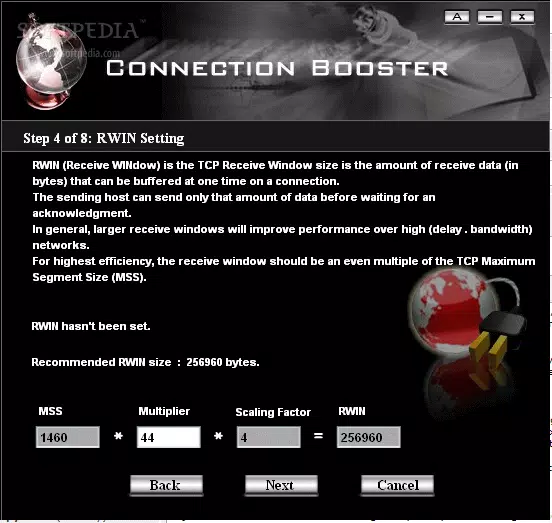
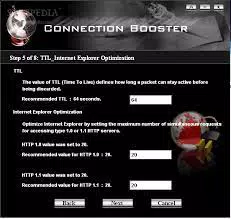
Within the broader software ecosystem, TZ Connection Booster fills a specific gap by offering a dedicated solution for system-level network adjustments. Unlike general network tools, it focuses on low-level parameters such as MTU, MSS, RWIN, and TTL—settings that directly influence data transmission efficiency. While the app is not mobile-based, its functionality is highly relevant in an era where internet reliability is paramount for productivity and entertainment.
Key Features & Functionality
- Optimizes Various Connection Types – TZ Connection Booster supports modem, ADSL, Cable, DSL, and LAN connections, adjusting settings to maximize throughput regardless of ISP or network infrastructure. This ensures faster web browsing and improved download speeds across diverse environments.
- Enhances Internet Explorer Stability – The application configures Internet Explorer for greater reliability, reducing browser crashes and improving session continuity during extended use.
- Prevents Automatic Disconnections – By maintaining consistent connection parameters, the tool helps prevent unexpected dropouts, ensuring uninterrupted access to online services.
- Advanced System Adjustments – Automatically detects the operating system and fine-tunes critical network settings such as MTU, MSS, RWIN, and TTL to align with optimal performance standards.
- MTU Discovery and Black Hole Router Detection – The software performs automated MTU discovery across the network path and identifies routers that may interfere with this process, ensuring efficient packet transmission and reducing latency.
For example, a gamer using a DSL connection could experience reduced ping times and fewer disconnects during competitive matches. A remote worker relying on a cable modem might benefit from more stable video calls and faster file uploads. Similarly, users downloading large files can expect fewer interruptions and improved transfer rates. These features collectively contribute to a smoother, more dependable internet experience without requiring manual configuration.
Interface, UX & Performance
TZ Connection Booster presents a clean, minimalistic interface designed for ease of use. The layout prioritizes functionality over visual flair, with clearly labeled options and a straightforward workflow. Navigation is intuitive, guiding users through the optimization process with minimal steps. The application does not require prior networking knowledge, making it accessible to average users.
Although the developer did not list formal performance metrics, the tool operates in the background with low resource consumption. Users can expect stable operation across a range of Windows systems, from older desktops to modern machines. Responsiveness is maintained during configuration tasks, and the software does not interfere with ongoing internet activities. Stability is a key focus, with no reported issues related to crashes or system conflicts.
Performance on different device categories is not explicitly detailed. However, given its small file size of 4.3 MB and lightweight design, it is likely compatible with a broad range of hardware configurations. The application completes optimizations quickly and efficiently, typically within seconds after launch. Users can run it periodically to maintain optimal settings, especially after network changes or system updates.
Platform Compatibility & Technical Requirements
TZ Connection Booster is available exclusively for Windows operating systems. The current version is 2.0.0, released on July 15, 2024. The application has a file size of 4.3 MB, indicating a lightweight footprint suitable for systems with limited storage. The developer did not specify minimum OS requirements or compatibility details beyond the platform.
Given its nature as a system-level network utility, it likely requires administrative privileges to modify network settings. However, no explicit permission details were provided. Users should ensure their Windows environment supports the necessary system-level changes. The app does not appear to be available on mobile platforms or macOS, limiting its accessibility to Windows users only.
Specific hardware or processor requirements were not disclosed. The small size and low resource profile suggest compatibility with most modern Windows devices. For users upgrading their system, it is advisable to verify compatibility with their current OS version before installation.
Pros and Cons
Pros
- Optimizes multiple connection types including DSL, Cable, and LAN
- Improves stability of Internet Explorer and reduces crashes
- Prevents automatic disconnections during use
- Automatically detects and adjusts system-level network parameters
- Small file size with minimal system resource usage
Cons
- Not available on mobile platforms or macOS
- Price point of $29.99 may be high for casual users
- Developer did not provide detailed system requirements
- Focus limited to Windows, restricting cross-platform use
- No public information on update frequency or support channels
FAQ
Is TZ Connection Booster safe to install?
Yes, the application is designed to modify system network settings safely. It does not include malware or intrusive behavior. However, users should only download it from official sources to ensure integrity.
Can I use TZ Connection Booster on any Windows version?
The developer did not specify minimum OS requirements. It is recommended to check compatibility with your current Windows version before installation.
Does the app require admin rights to run?
Given its ability to adjust network settings, it likely requires administrative privileges. Users may need to run the application as an administrator for full functionality.
How often should I update TZ Connection Booster?
Updates are not publicly documented. It is advisable to check the official website periodically for new versions or patches.
Is TZ Connection Booster compatible with all internet service providers?
Yes, the tool is designed to work with various ISPs and connection types, including modem, ADSL, Cable, DSL, and LAN, without requiring provider-specific configurations.
Final Thoughts
TZ Connection Booster delivers a focused, effective solution for users seeking to enhance their Windows-based internet performance. Its ability to optimize network settings across multiple connection types makes it a valuable tool for gamers, remote workers, and anyone dealing with slow or unstable connections. The inclusion of features like MTU discovery, black hole router detection, and Internet Explorer stability improvements adds significant practical value.
While the $29.99 price may deter some users, the tool’s targeted functionality and system-level adjustments justify its cost for those who depend on consistent, high-performance internet access. The lack of mobile support and limited public information on updates or developer support are notable drawbacks, but the app’s core performance remains strong.
For Windows users facing connectivity issues or seeking to maximize their network speed and stability, TZ Connection Booster offers a reliable, no-frills solution. Download TZ Connection Booster now


